


Add buttons social participation, multi-functionse
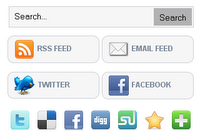
Characterized by the added Ba Chtsar tools added is not a new kind of content, but new and wonderful
In terms of the multiplicity of functions, as well subscribe to it in the mailing list
Follow-up with the property owner of the code or code Nevshaaly Twitter and Facebook
Also with the search feature in the code .. with a property issue or post code on sites publishing
Social and published..
> _demo
Step 1. In Your Blogger Dashboard Click > Design > Edit Html > Tick The Expand Widget Templates Box.


Step 2.Click Ctrl and F, and Search for </ head> and Paste the following code
Just above it paste the code given below,
<style type="text/css">
.subbox{width:305px;border:0 solid #141414;overflow:hidden}
.addthis_toolbox{padding:15px 0 5px 0;text-align:center}
.addthis_toolbox .custom_images a{width:32px;height:32px;margin:0 4px 0 4px;padding:0}
.addthis_toolbox .custom_images a:hover img{opacity:1}
.addthis_toolbox .custom_images a img{opacity:0.85}
.rssbox{background:#f7f6f6;border:1px solid #ccd1d7;padding:5px 10px;margin:10px 0 0 0;-moz-border-radius:10px;-khtml-border-radius:10px;-webkit-border-radius:10px;border-radius:10px;width:125px}
.rssbox:hover{border:1px solid #92aed1}
.rssbox a{color:#7c8a9b;text-transform:uppercase;text-decoration:none;font:bold 12px Arial,Helvetica,Sans-serif}
.rssbox a:hover{color:#7c8a9b;text-decoration:underline}
.emailsbox{background:#f7f6f6;border:1px solid #ccd1d7;padding:5px 10px;margin:10px 0 0 0;-moz-border-radius:10px;-khtml-border-radius:10px;-webkit-border-radius:10px;border-radius:10px;width:125px}
.emailsbox:hover{border:1px solid #92aed1}
.emailsbox a{color:#7c8a9b;text-transform:uppercase;text-decoration:none;font:bold 12px Arial,Helvetica,Sans-serif}
.emailsbox a:hover{color:#7c8a9b;text-decoration:underline}
.twitterbox{background:#f7f6f6;border:1px solid #ccd1d7;padding:5px 10px;margin:10px 0 0 0;-moz-border-radius:10px;-khtml-border-radius:10px;-webkit-border-radius:10px;border-radius:10px;width:125px}
.twitterbox:hover{border:1px solid #92aed1}
.twitterbox a{color:#7c8a9b;text-transform:uppercase;text-decoration:none;font:bold 12px Arial,Helvetica,Sans-serif}
.twitterbox a:hover{color:#7c8a9b;text-decoration:underline}
.facebookbox{background:#f7f6f6;border:1px solid #ccd1d7;padding:5px 10px;margin:10px 0 0 0;-moz-border-radius:10px;-khtml-border-radius:10px;-webkit-border-radius:10px;border-radius:10px;width:125px}
.facebookbox:hover{border:1px solid #92aed1}
.facebookbox a{color:#7c8a9b;text-transform:uppercase;text-decoration:none;font:bold 12px Arial,Helvetica,Sans-serif}
.facebookbox a:hover{color:#7c8a9b;text-decoration:underline}
#search{width:290px;padding:2px 2px;background:#f7f6f6;border:1px solid #ccd1d7;height:28px;margin-top:0;margin-left:5px;display:inline;float:left}
#search:hover{border:1px solid #92aed1}
#search form{margin:0;padding:0}
#search fieldset{margin:0;padding:0;border:none}
#search p{margin:0;font-size:85%}
#s{width:200px;margin:0 0 0 0;padding:5px 5px 5px 5px;border:none;font:normal 80% "Tahoma",Arial,Helvetica,sans-serif;color:#000;float:left;background:#f7f6f6;display:inline}
input#searchsubmit{float:right;display:inline;margin:0 0 0 0;height:28px;background:#b2b2b2;color:#000;border:0 solid #222}
</style>
Step2. In your Blogger dashboard click Design > Add A Gadget > Choose Html/Javascript.


<div class="subbox">
<div id='search' style='display:inline;'>
<form action='/search' id='searchform' method='get'>
<input id="s" name="q" onblur="if (this.value == "") {this.value = "Search...";}" onfocus="if (this.value == "Search...") {this.value = "";}" type="text" value="Search..." />
<input id="searchsubmit" type="submit" value="Search" />
</form>
</div>
<table><tr>
<td><div class="rssbox">
<a href="http://feeds.feedburner.com/FEEDBURNER-ID" target="_blank" rel="nofollow"><img src="https://blogger.googleusercontent.com/img/b/R29vZ2xl/AVvXsEgsZ_xaTvGbHSsrOaG_q5UZQxTXiqR7JSk7JPAfyflygBBBkJvi2rKYaw6g9DEGswGyIk5nE-2otlGH4B_SPqKsewV8auXph-xMEvu33MLqIafbzigph7kDRXL8JklqtPBPpHIuoLMA6N3l/" alt="RSS Feed" title="RSS Feed" style="vertical-align:middle; margin-right: 5px;border:none;" /></a><a href="http://feeds.feedburner.com/FEEDBURNER-ID" target="_blank" rel="nofollow">RSS Feed</a></div></td>
<td><div class="emailsbox">
<a href="http://feedburner.google.com/fb/a/mailverify?uri=FEEDBURNER-ID" target="_blank" rel="nofollow"><img src="https://blogger.googleusercontent.com/img/b/R29vZ2xl/AVvXsEiYSPyiGwkc1Dq5phWwBJqXDAFhv60FB1v-yf4WleeTPomvt5TJgx_yjYEXjU_3txY_p_twwJ7O6Vv0PBw80_C8nqGQSbk7PVtC7AONOtO9fY8rR78zfQUn3fYPGwN9E6YVmqAXaV8jNroE/" alt="EMail Feed" title="EMail Feed" style="vertical-align:middle; margin-right: 5px;border:none;" /></a><a href="http://feedburner.google.com/fb/a/mailverify?uri=FEEDBURNER-ID" target="_blank" rel="nofollow">EMail Feed</a></div></td>
</tr><tr>
<td><div class="twitterbox">
<a href="http://twitter.com/TWITTER-USERNAME" target="_blank" rel="nofollow"><img src="https://blogger.googleusercontent.com/img/b/R29vZ2xl/AVvXsEgr3QQy_93uu-eLn0cE69Ex17ABpvyE2iNnD7qA1E-HFVHs7rrjVtN3ZVUt71ACKwSaGpKoxtYfLvpvjR1OXZLRGgLEokfqA8IZDeQR8YHONgF1OQe5YW0iXD5eBoWX3ohfEsbTmefRzaSy/" alt="Twitter" title="Twitter" style="vertical-align:middle; margin-right: 5px;border:none;" /></a><a href="http://twitter.com/TWITTER-USERNAME" target="_blank" rel="nofollow">Twitter</a></div></td>
<td><div class="facebookbox">
<a href="http://www.facebook.com/FACEBOOK-USERNAME" target="_blank" rel="nofollow"><img src="https://blogger.googleusercontent.com/img/b/R29vZ2xl/AVvXsEgOd1Lk342OWesKvxSk8OfMEcpFsIA7q5gv3hzFzhzwNRB7PskjtP5b_5-YSZn8DAxI0ADVXV4K3gM5Q8L70_4eYMMaEi-6UbY5UTKH1HelaG8Xsi3uzzQ3-_wF1B-Ah77rwOBk4_EcI6-J/" alt="Facebook" title="Facebook" style="vertical-align:middle; margin-right: 5px;border:none;" /></a><a href="http://www.facebook.com/FACEBOOK-USERNAME" target="_blank" rel="nofollow">Facebook</a></div></td>
</tr></table>
<p style="display:none;" align="center">Widget by <a href="http://www.bloggertipandtrick.net/" target="_blank">Blogger Tips And Tricks</a></p>
<div class='addthis_toolbox'>
<div class='custom_images'>
<a class='addthis_button_twitter'><img alt='Twitter' height='32' src='https://blogger.googleusercontent.com/img/b/R29vZ2xl/AVvXsEiKLWxNSCmTTztlgjauCnCpsuuI-0REERu7i4ulOytGcLZdQX5qRn440tiEpSlj4o_8y5zHfCmzHuIwFruVSn_tDsvNf2NeJy9VWl33gT84E1ws5AsffxY_cu3G1sX6otF18BDqrB-ehqo/' width='32'/></a>
<a class='addthis_button_delicious'><img alt='Delicious' height='32' src='https://blogger.googleusercontent.com/img/b/R29vZ2xl/AVvXsEhYirvNN5WYruyK8W0NTIGvSMw_tZW8_QiWPh_T3oKe3GMXySx6fmiOdRCKNuaHqDT-jOSInQSUsSmp1sM-WM8Ux2S3BQIHLCfXB_RX5gXT0dvWnCIRpQ9aYyGm-335uOY_AJfOXZYSOrM/' width='32'/></a>
<a class='addthis_button_facebook'><img alt='Facebook' height='32' src='https://blogger.googleusercontent.com/img/b/R29vZ2xl/AVvXsEgyNlgTbZBPErU5AOkftGN09t1YtyRJFUhL05qtgdNpvcEI9UsGWwXYWHvAtXooSY7Flf_qV7sY12dGyv1YOTB2hkpXt76suffRBux0phBonBKtkhbclQWgoLqfmbB8nuJRJ_Ijh2Zhxpw/' width='32'/></a>
<a class='addthis_button_digg'><img alt='Digg' height='32' src='https://blogger.googleusercontent.com/img/b/R29vZ2xl/AVvXsEgHI2-VMl4loIw2XdQOlGWiHxY9mKlHWCmYqhhom139y8D63MVKCn71XSyTYtxe9m0GZvfS421bfRN_JzcJliOkqqqmNANrt2KD6xO8b_HFR2gAxkIOeUMKKyi44s6k1o6Q6yXtffSu_4w/' width='32'/></a>
<a class='addthis_button_stumbleupon'><img alt='Stumbleupon' height='32' src='https://blogger.googleusercontent.com/img/b/R29vZ2xl/AVvXsEjZxu0A3yZA81UOMaajxBOlV4BCtOTfjLZyPejp5q_QZe_cZceGmLT1MAvfgtLAoaxX5dhYN0pJSyq-2NPqobJrpOnjqwZnZiv38_QGV9kW7tqdnHRLJCZVx3Zf-XZ8brJEZis4c5GapfM/' width='32'/></a>
<a class='addthis_button_favorites'><img alt='Favorites' height='32' src='https://blogger.googleusercontent.com/img/b/R29vZ2xl/AVvXsEjxlMw6ovcPqm_DgK6DH8xFNxn9lI1K4VaJGjTwisZqQSkAVjiqmttsPgr2N3Gc2c7CkXbTYg9M3MJuN2NEcjlDsdLhEPiYkZV_YONJ_FgWAjxawD1v2uhS97oLxc7dIBblXePfvio2heE/' width='32'/></a>
<a class='addthis_button_more'><img alt='More' height='32' src='https://blogger.googleusercontent.com/img/b/R29vZ2xl/AVvXsEgFmGZuOoQY43Xa6-HA0NUJmij2mxO9WKFIy6XnSNrYscINpXikv7514cM3pNQKZ5sNmLh96T7pstNd0RPyhhCxr0gjyyfyTS-D1Sq91fBzOKQEYQtGJeGczjtJfY17-LaOkJq5mHXises/' width='32'/></a>
</div>
<script src='http://s7.addthis.com/js/250/addthis_widget.js' type='text/javascript'/>
</div>
</div>
If I wanted without a search engine and tape Salafist such a form:

Ignore the above code put this:
<div class="subbox">
<table><tbody><tr>
<td><div class="rssbox">
<a href="http://feeds.feedburner.com/FEEDBURNER-ID" target="_blank" rel="nofollow"><img src="https://blogger.googleusercontent.com/img/b/R29vZ2xl/AVvXsEgsZ_xaTvGbHSsrOaG_q5UZQxTXiqR7JSk7JPAfyflygBBBkJvi2rKYaw6g9DEGswGyIk5nE-2otlGH4B_SPqKsewV8auXph-xMEvu33MLqIafbzigph7kDRXL8JklqtPBPpHIuoLMA6N3l/" alt="RSS Feed" title="RSS Feed" style="vertical-align: middle; margin-right: 5px; border: medium none;" /></a><a href="http://feeds.feedburner.com/FEEDBURNER-ID" target="_blank" rel="nofollow">RSS Feed</a>
</div></td>
<td><div class="emailsbox">
<a href="http://feedburner.google.com/fb/a/mailverify?uri=FEEDBURNER-ID" target="_blank" rel="nofollow"><img src="https://blogger.googleusercontent.com/img/b/R29vZ2xl/AVvXsEiYSPyiGwkc1Dq5phWwBJqXDAFhv60FB1v-yf4WleeTPomvt5TJgx_yjYEXjU_3txY_p_twwJ7O6Vv0PBw80_C8nqGQSbk7PVtC7AONOtO9fY8rR78zfQUn3fYPGwN9E6YVmqAXaV8jNroE/" alt="EMail Feed" title="EMail Feed" style="vertical-align: middle; margin-right: 5px; border: medium none;" /></a><a href="http://feedburner.google.com/fb/a/mailverify?uri=FEEDBURNER-ID" target="_blank" rel="nofollow">EMail Feed</a>
</div></td>
</tr><tr>
<td><div class="twitterbox">
<a href="http://twitter.com/TWITTER-USERNAME" target="_blank" rel="nofollow"><img src="https://blogger.googleusercontent.com/img/b/R29vZ2xl/AVvXsEgr3QQy_93uu-eLn0cE69Ex17ABpvyE2iNnD7qA1E-HFVHs7rrjVtN3ZVUt71ACKwSaGpKoxtYfLvpvjR1OXZLRGgLEokfqA8IZDeQR8YHONgF1OQe5YW0iXD5eBoWX3ohfEsbTmefRzaSy/" alt="Twitter" title="Twitter" style="vertical-align: middle; margin-right: 5px; border: medium none;" /></a><a href="http://twitter.com/TWITTER-USERNAME" target="_blank" rel="nofollow">Twitter</a>
</div></td>
<td><div class="facebookbox">
<a href="http://www.facebook.com/FACEBOOK-USERNAME" target="_blank" rel="nofollow"><img src="https://blogger.googleusercontent.com/img/b/R29vZ2xl/AVvXsEgOd1Lk342OWesKvxSk8OfMEcpFsIA7q5gv3hzFzhzwNRB7PskjtP5b_5-YSZn8DAxI0ADVXV4K3gM5Q8L70_4eYMMaEi-6UbY5UTKH1HelaG8Xsi3uzzQ3-_wF1B-Ah77rwOBk4_EcI6-J/" alt="Facebook" title="Facebook" style="vertical-align: middle; margin-right: 5px; border: medium none;" /></a><a href="http://www.facebook.com/FACEBOOK-USERNAME" target="_blank" rel="nofollow">Facebook</a>
</div></td>
</tr></tbody></table>
</div>
Note: Do not forget to change the variables below before saving tool,
- FEEDBURNER-ID, change your name to Vidbernr.
- TWITTER-USERNAME, change the name of your account on Twitter.
- FACEBOOK-USERNAME, change the name of your account on Facebook.
Save your template and you are Done

0 التعليقات:
Post a Comment